 HackingPassion.com
Synology NAS Hole Rated 9.8 Opens Files Without a Password and Three DSM Versions Still Have No Fix
Ethical Hacking Complete Course Zero to Expert
Hack like black hat hackers. Penetration testing, Kali Linux, WiFi and web hacking, and the hacker mindset behind it.
→ Take the full courseHome NAS boxes from Synology can be opened over the network without a password, rated 9.8: files read, files overwritten. That is the factory setup. For DSM 7.2.2, 7.2.1 and 7.1 there is still no fix. And attackers already use an old Synology NAS bug, CISA says.
A NAS is a box with hard drives that sits on your home or office network, often right next to the router. It keeps what the computers and phones around it should not lose: the photos from your phone, the backups of your laptop, scanned documents, shared folders. Synology makes these boxes, and the software on them is called DSM, short for DiskStation Manager. You log into it through a web page, and from there you manage the files, the users and the apps on the box.
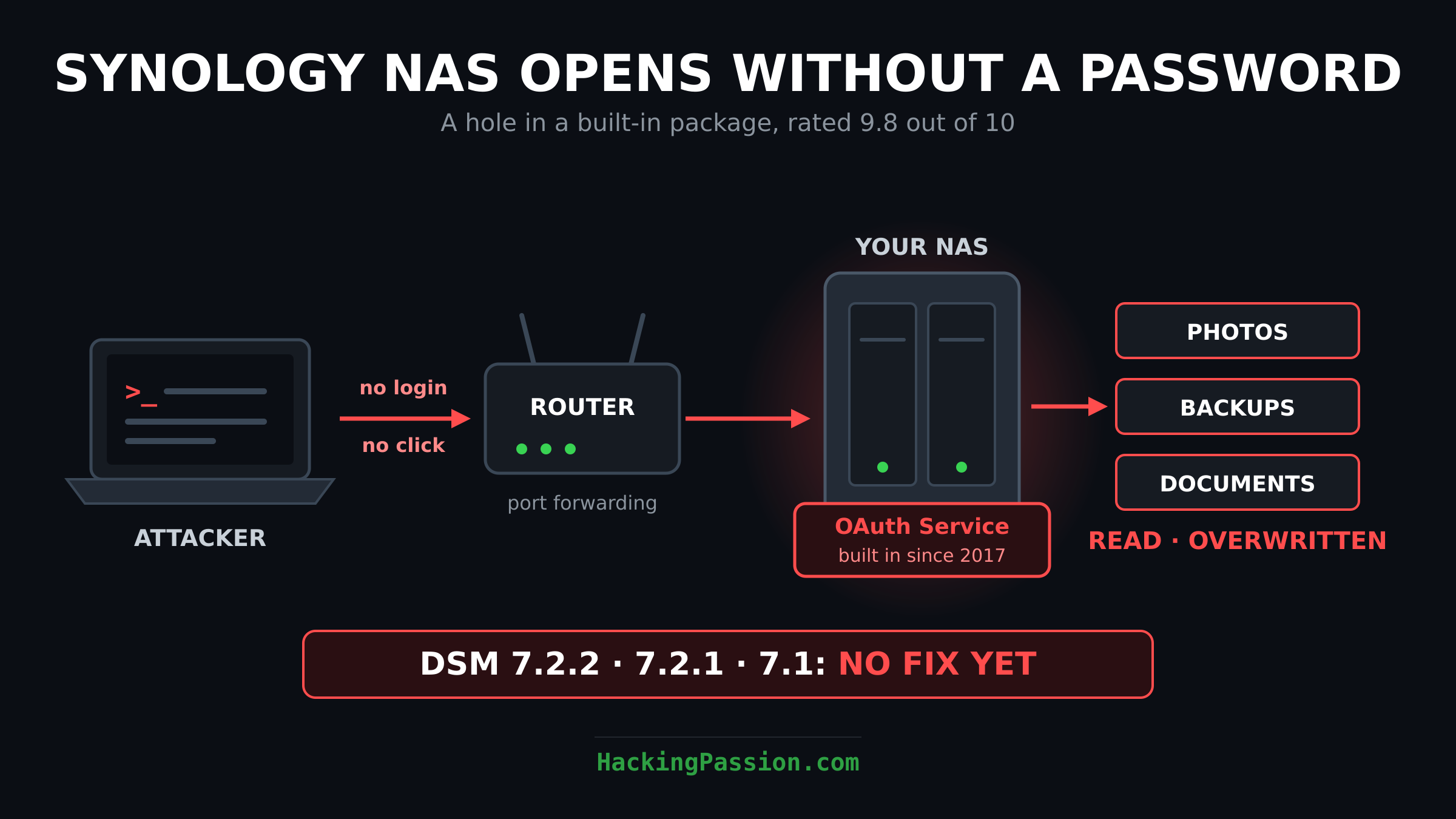
This week Synology warned about a hole in DSM with the number CVE-2026-120382. It got a score of 9.8 out of 10, and Synology put it in its highest category, Critical.
That score comes from a short line in the advisory: AV:N/AC:L/PR:N/UI:N. Each part says something about the attack. It comes in over the network and is not hard to do, the attacker needs no account on your NAS, and you do not have to click or open anything for it to work. What the attacker gets, according to Synology, is your files to read, the possibility to write files onto the box, and the possibility to knock it offline.
Normally a warning like this comes with an update, but when Synology put this one online, the status said Ongoing and there was nothing to download yet. For DSM 7.4 and 7.3, Synology promised a fix by November 20. Two days later, DSM 7.2.2, DSM 7.2.1, DSM 7.1 and BeeStation OS 1.5, the system on Synology’s smaller home storage box, still have none. For 7.2.2 and 7.2.1, Synology’s advice is to move up to DSM 7.3. For DSM 7.1 and the BeeStation there is not even a date.
The technical part of the advisory goes back further than that table. It also names DSM 6.2, and it gives the build numbers that will carry the fix for the older versions: 6.2.4-25556-9, 7.1.1-42962-10, 7.2.1-69057-14 and 7.2.2-72806-11. Open Synology’s own download archive, where the company stores its DSM builds, and those builds are not there. The newest there are still 7.2.2-72806-10, 7.2.1-69057-13 and 7.1.1-42962-9.
For owners who cannot update, Synology has one piece of advice: switch off the package called OAuth Service. That is where the bug sits, in the part of DSM that handles OAuth.
OAuth is what happens when an app asks to use your account somewhere else. You know the screen: you sign in, and then you get the question whether this app may have access. You type your password at the service itself, never in the app, and the app gets a token back, a long string that says what it is allowed to do. OAuth Service does that for your NAS. Synology describes it as the package that lets you give apps from other companies access to DSM through those tokens, without sharing your login.
It is already on the box: in its own release notes, Synology calls OAuth Service a built-in package, from the very first version on October 5, 2017. A few months later, in March 2018, it was the part that let an Amazon Echo play music from Audio Station on the NAS when you asked it to. Since October 2025 the newer versions of the package need DSM 7.3 or higher, so a box on DSM 7.2 keeps running an older version of it.
What exactly breaks inside it, Synology does not say, and the advisory names no researcher. What it does give is the type of bug, and that tells a lot: CWE-88, Improper Neutralization of Argument Delimiters in a Command.
A program on the NAS builds a command for the operating system and puts something into it that came from outside, a username for example, or a value from a web request. That piece is supposed to be one word in the command. When the program does not check where that word ends, the person sending it can add words of their own: a space, two dashes, and an option the program never meant to offer.
Command-line tools are full of options like that. Take curl, the tool that downloads things from the web. With -o it saves the download to whatever path you put behind it, and with --config it reads its settings from a file you point it to. That is only an example of this type of bug, not Synology’s code, which has not been published. Slip one of those options into a command, and the tool reads or writes files for the attacker, with the rights of the service that runs it.
Nine days before, on November 10, Synology had already put out SA-26:19, also Critical, with two bugs in DSM. The first is an SQL injection in the part of DSM that handles logging in. It scored 9.8 as well, with the same result: files read and written and the box knocked offline, without an account. The second is a way past the login through rsync, the service DSM uses to copy files between machines, scored 8.6. Two researchers from the Viettel Cyber Security Research Lab and a researcher named Warisse Valentin found them.
And three seconds before the OAuth warning went online, Synology published another one, SA-26:20, which it called NGINX2Root, for CVE-2026-123007. NGINX is the web server software that DSM uses, and this bug is in the way it handles HTTP/2, the newer version of the protocol your browser uses to talk to websites. Under certain traffic, it writes past the end of a piece of memory, and the worker process usually crashes. On a system where ASLR, the protection that puts memory at random places, is switched off or can be bypassed, an attacker can run code. The score is 8.1.
The bug sits in that web server software itself. F5, the company behind it, published it on November 18 after four research teams reported it, and it goes back to version 1.9.5, so other servers that run it with HTTP/2 switched on have it too. One of those researchers, Stephen Fewer of Rapid7, has put proof-of-concept exploit code on GitHub. It runs code without a login against NGINX 1.31.8 in a test container, and according to his write-up it takes about 128 GB of HTTP/2 traffic, roughly 17 minutes on a 1 Gbit/s connection. He built it for that test setup, not for DSM. On DSM 7.2.2, 7.2.1 and 7.1 this bug is also still waiting for its fix.
Also on November 18, CISA, the US agency for cybersecurity, added four bugs to its list of bugs it has proof attackers are using. One of them is from Synology: CVE-2024-10441.
That bug comes from Pwn2Own 2024, a hacking contest where researchers break into devices for prize money and then hand the bugs to the makers. CVE-2024-10441 sits in a background service of DSM, scored 9.8 as well, and lets an attacker run code on the NAS without an account. Synology fixed it on November 5, 2024, for DSM 7.2.2. The fix for DSM 7.2 followed on February 11, 2025.
Two years later, the bug is being used in attacks, and that can only work on boxes that never got that update. The agency gave US federal agencies until November 21 to install the fix, or to stop using the product if they cannot. It also marked this bug for forensic triage, which means agencies have to look for signs that someone already got in. An update closes the hole, but it does not remove an attacker who is already inside.
Whether ransomware is involved, the agency marks as unknown. Synology had already said more, three weeks earlier. On October 29 it warned that attackers were using a vulnerability patched in December 2024 against boxes running an outdated DSM, to encrypt the data and demand a ransom. For the details, Synology pointed to SA-24:20, the same advisory that holds CVE-2024-10441. Which of the bugs in that advisory the attackers use, Synology does not say, and who is behind the attacks, neither of them says.
How a NAS can go two years without an update is partly explained in Synology’s own release notes. Above the smaller updates there is a note that your NAS may not tell you about them. Sometimes the update is not out in your region yet, because it rolls out in stages over a few days. And sometimes the system looks at its own services and settings and decides it does not need this update, and then you get no message at all.
For the big DSM releases it goes further. 48 older models get no update offered on the box. The owner has to go to Synology’s website and download it. And for 58 models, DSM 7.4 is the last version they can upgrade to.
The OAuth fix shows the same gap. For DSM 7.4 and 7.3 it came out on November 20 as 7.4.1-90080-2 and 7.3.2-86009-6, and Synology’s download archive has had a file for each model since that day. The release notes page still did not show either build on November 21, so an owner who checks there finds nothing new.
How many boxes can be reached from the internet with this hole has not been counted for this bug. Two years ago, the researchers at Midnight Blue looked at Synology boxes for a bug in Synology Photos. Shodan and Censys, two search engines that index devices on the internet, already showed hundreds of thousands of Synology NAS devices reachable from outside back then. The researchers estimated that one to two million boxes were reachable and had that Photos bug at the same time.
Those boxes were reachable through port forwarding, or through QuickConnect, Synology’s own service for getting to your NAS from outside. Port forwarding is a rule in your router that sends traffic from the internet straight to one device in your house. Set that up for the NAS, and the DSM login page is on the internet. For a bug that needs no account and no click, the box only has to be reachable.
Synology mentions no attacks with CVE-2026-120382 so far, and there is no public exploit code for it. For DSM 7.4 and DSM 7.3 the fix is out. For the other versions, switching off the package is the only protection against this bug.
What you can do right now:
→ Check which DSM version your NAS runs: Control Panel, Info Center.
→ On DSM 7.4 or 7.3: install 7.4.1-90080-2 or 7.3.2-86009-6, both out since November 20. If your NAS does not offer it, download the
.patfile for your model from the Synology Download Center and install it under Control Panel, Update & Restore, Manual DSM Update. Until it is installed, stop OAuth Service as described below.→ On DSM 7.2.2, 7.2.1 or 7.1: open Package Center, find OAuth Service and stop it. If an app or an Alexa skill can no longer sign in to your NAS after that, this is why. Start it again once your version has the fix. The same advice goes for BeeStation OS 1.5.
→ For NGINX2Root: switch off HTTP/2 under Control Panel, Network, Connectivity. Stopping OAuth Service does nothing for that bug.
→ Make sure the fix from 2024 is on the box: DSM 7.2.2-72806 Update 1 or later, 7.2.1-69057 Update 6 or later, or 7.2-64570 Update 4 or later.
→ Look in your router for port forwarding rules that point to the NAS, usually ports
5000and5001. If you need the NAS from outside, reach it through a VPN instead of putting the login page on the internet. And switch off QuickConnect if you do not use it: for the Photos bug of 2024, the same researchers showed that QuickConnect made boxes reachable even without port forwarding.
Want to see what your NAS shows the internet? Look up your public IP on Shodan, or scan it with Nmap over mobile data.
My Ethical Hacking Complete Course Zero to Expert takes you there step by step: reconnaissance, scanning, exploitation and traffic analysis, hands-on, from your first day with no Linux or hacking background.
→ Join my complete ethical hacking course
Hacking is not a hobby but a way of life.
Sources:
Synology SA-26:21 | Synology ransomware warning | CISA KEV catalog
Stay updated
Get the latest posts in your inbox every week. Ethical hacking, security news, tutorials, and everything that catches my attention. If that sounds useful, drop your email below.