 HackingPassion.com
mSecure Password Manager Tells Customers to Replace Their Passwords, 2FA and Passkeys Without Saying Why
Ethical Hacking Complete Course Zero to Expert
Hack like black hat hackers. Penetration testing, Kali Linux, WiFi and web hacking, and the hacker mindset behind it.
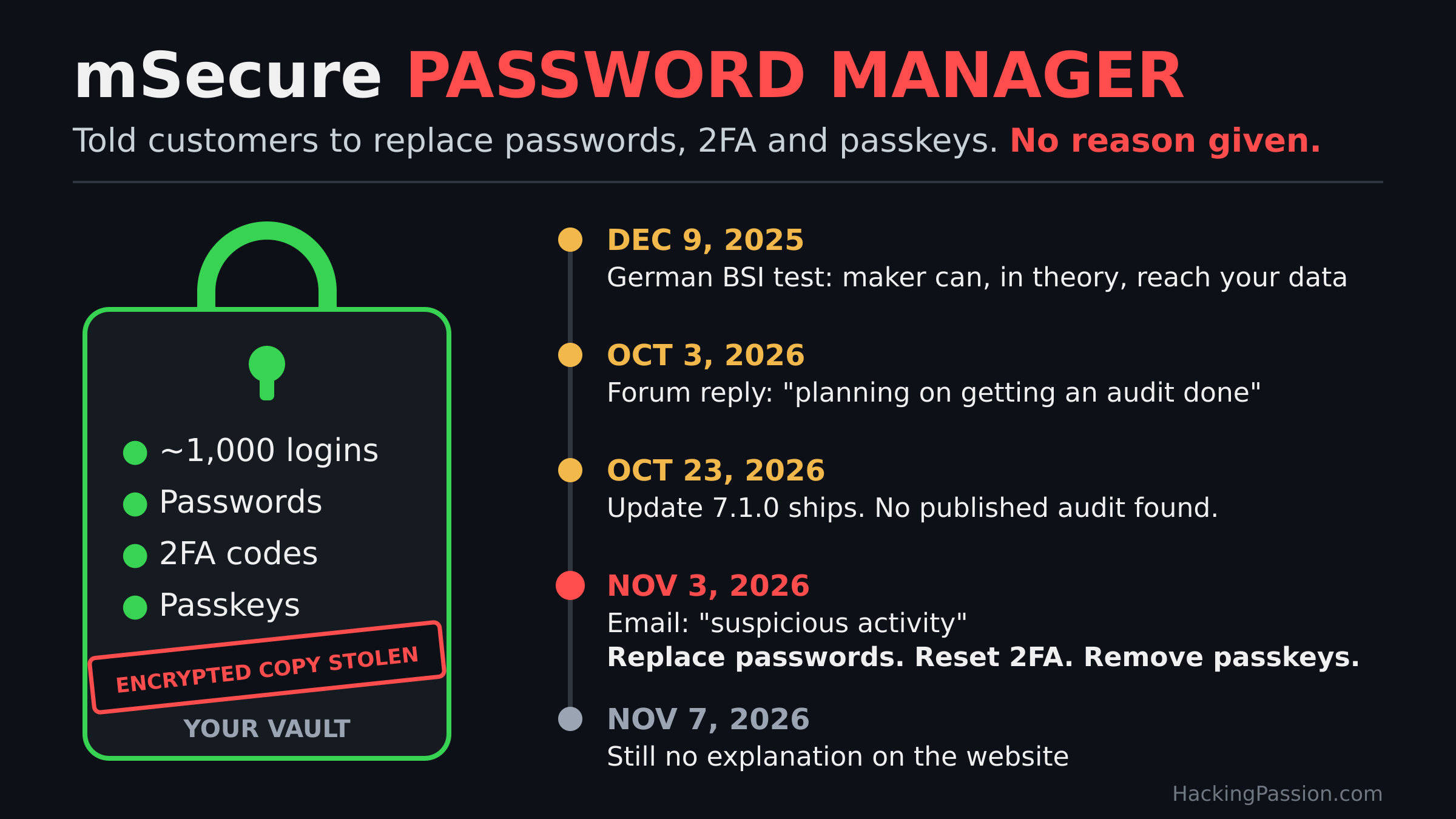
→ Take the full courseCustomers with close to 1,000 logins in one password manager got one email: change the passwords, reset the 2FA, remove the passkeys. No reason given. A German government test flagged it 11 months earlier.
After a few years, almost everything ends up in your password manager. The login for your bank, your email, your work accounts, the six-digit codes for two-factor login, and lately your passkeys as well. You remember one master password, and the app remembers the rest.
On November 3, customers of the password manager mSecure opened an email from mSeven Software, the company in Lake Oswego, Oregon, that makes the app. Former customers, who had stopped using it, got the same email.
It said the company had “recently learned of suspicious activity” connected to mSecure. They had started an investigation, taken steps to limit the damage, and brought in outside security experts. Then came the advice. Because of the potential security implications, you should immediately protect the confidential information you keep in the app. That could mean changing passwords, resetting or re-enrolling two-factor authentication, or removing existing passkeys.
The last line read: “We regret any inconvenience that this may cause.”
That was all. Nothing about what the suspicious activity was, when it happened, which systems were involved, or whether customer data had been taken. The email gave so little that customers on the forum asked each other whether it was genuine or a phishing attempt.
On mSecure’s own support forum, customers started counting what that advice meant for them. One has more than 800 entries in the vault. Another has almost 1,000. Others wrote 355, 400, more than 500, and some said they had trusted the app with their logins for about ten years. Each of them wanted to know the same thing, whether this meant all of them.
Reporters asked mSecure what had happened and got no answer. Today, four days after the email, the website and the blog still say nothing about it. In the forum threads full of worried customers, I could not find a single reply from the company.
The explanation came in a different way. Customers who opened a support ticket got an answer by email and pasted it into the forum. Several of them got exactly the same text.
In that reply, the company writes that an unauthorized party acquired an encrypted copy of a database containing information belonging to current and former users. The incident concerns customers who synced through mSecure Cloud, the company’s own sync service. They say they have no evidence that the confidential information inside was accessed, and no evidence that the app is unsafe to use today. In the same reply, they still tell you to change your master password and your important passwords, reset your two-factor authentication, and replace your passkeys.
mSecure explains on its support pages how it locks your vault. When you create an account, the app makes a random key of 46 characters on your phone or computer. They call it the Account Key, and it locks your vault with AES-256 encryption. Your master password, in turn, locks that key. According to the company, the locked key is stored only on your device. What does go to mSecure Cloud is your vault in encrypted form, plus a known bit of text, also encrypted, that the app uses to check that it has the right key.
mSecure’s own help page for Android tells it differently. There, the company writes that it encrypts your data with a long, randomly generated key “stored in the mSecure Cloud”, the same service this incident is about.
If the security page is right, a random 46-character key protects the stolen copy, and no computer we have today can guess a key that long.
Why you should change your master password, the company has not explained. Your password is on their servers too, in a scrambled form. Almost four years ago, a staff member wrote on the support forum that the account system runs on Parse, an open-source server, and that it stores your account password as a one-way fingerprint, called a bcrypt hash. Whoever holds that fingerprint cannot turn it back into your password, but they can guess: turn each guess into a fingerprint and see if it matches. Bcrypt slows each guess down on purpose, with a setting called the cost. In Parse’s code the cost is 10, and that number is an exponent: 2 to the power of 10, so 1,024 rounds of work for one single guess.
In an older thread, he wrote that they had not added rounds of PBKDF2, another way to slow guessing down, and that the password does not encrypt the vault itself. Whether those password hashes were in the stolen copy, the company has not said.
The same staff member answered a customer who asked, after the LastPass breach of 2022, what mSecure did to keep that from happening to them. He called the design “Zero Knowledge” and wrote that the only way through the encryption was to keep guessing until the data decrypted. If the data were ever stolen, he added, there was “realistically no way it could ever be used”, and they would warn their users. This week they did warn them, without saying what happened, and told them to replace almost everything.
Germany’s federal cybersecurity agency, the BSI, had looked at that design and came to a different conclusion. In December 2025, eleven months before this email, it published a test of ten password managers that it had run together with a consumer protection organization. mSecure 6.1.5 for Android was one of the ten. The agency’s finding on mSecure: while you use the app, the maker can, in theory, get to your data.
The testers found that the app sends the maker technical information, enough for the maker to reach the contents of your vault. The company told them it does not store those secrets.
They found more. With fingerprint or face login, you could set a new master password without knowing the old one. The agency called that a risk if your phone gets stolen, and the recovery feature was built on exactly that. When you share a password with someone through the app, part of the key travels along with it, and the company confirmed this. The app used RSA keys of 2048 bits, below what the agency recommends today. mSecure also does not publish how its encryption works, which security audits were done, or which outside code is inside the app. That makes it hard for outside researchers to check.
The company did not answer the testers’ technical questions. The verdict: the design falls short of what you can expect from a password manager. Before you use it, the agency wrote, ask yourself whether you want to trust the maker with nothing solid to base that trust on. Of the ten products in the test, three let the maker reach your data this way. mSecure was one of them.
Almost a year before this email, the agency had already questioned the promise that only you can open your vault. What is in the stolen copy, the test cannot tell, and the company says those secrets were never kept.
A customer brought those findings to mSecure’s own forum on October 3, 2026, and asked what had been done about them. A staff member replied that changing your master password with your fingerprint or face “does not pose a risk”. He also wrote that they were “planning on getting an audit done for mSecure 7”. Asked when, he said it would be a priority “soon after our next updates are released”. Version 7.1.0 came out on October 23. I could not find a published audit. Eleven days later, the email went out.
Then there are the former users. The reply says the database also held information about customers who had left. mSecure’s own help pages say that switching off mSecure Cloud sync removes your data from their servers, and that the account data is then permanently deleted. What they still held about former customers, and for how long, they have not said.
An encrypted copy can still cost money years later, and the 2022 breach from that Zero Knowledge question shows how. Attackers stole a backup of customer vaults from that password manager. The passwords and notes inside were encrypted with a key made from the master password. Newer accounts used 100,100 rounds of PBKDF2, but many older accounts had never been moved past 5,000 rounds or even fewer.
In March 2025, US federal prosecutors seized about 24 million dollars in cryptocurrency linked to a 150 million dollar theft. In their complaint, they wrote that the thieves had used data and passwords stored in victims’ online password manager accounts. The complaint does not name the password manager, but it describes two breaches at that service, in August and November 2022. Researchers who worked with dozens of victims found that many had kept their wallet recovery phrases in the vault and had chosen weak master passwords. A lot of them were also among the oldest customers of that service. The company behind it said law enforcement had not shown it any conclusive evidence linking crypto thefts to its incident.
Once a vault is stolen, the attacker keeps it. They can go on guessing offline, for years, with no login screen and no lockout to slow them down, and a weak master password that falls opens the vault behind it.
That is also why the advice goes further than passwords. mSecure can generate your two-factor codes inside the vault. In its own words, your 2FA codes live alongside your logins. And since mSecure 7 came out in June 2026, it stores your passkeys too.
A two-factor code comes from a secret that a website hands you once, usually as a QR code. Whoever holds that secret gets the same six-digit codes as your phone. When your password and that secret sit in the same vault, an opened vault gives both. Re-enrolling two-factor on the website gives you a new secret, and the old one stops working. A passkey works the same way: remove it on the site, create a new one, and the copy in the old vault is useless.
According to the support reply, this concerns customers who synced through mSecure Cloud, now or in the past. If your vault only lived on one device, or you synced through Wi-Fi, iCloud or Dropbox, the reply says you are not part of this, though the company has not said so in public. How many customers synced through the cloud, they have not said either. On Apple’s App Store alone, the app has about 52,000 ratings with an average of 4.8 stars, while mSecure’s own site only speaks of thousands who trust it.
What to do if you use mSecure Cloud, or ever did:
- → Open the sync setting in the app to see whether mSecure Cloud is on, and think back to whether you used it before
- → Change your mSecure master password first, as the company advises
- → Then change the password of your email account, because that is where the reset links for your other accounts arrive
- → After that, your bank, your work accounts, and any password you used on more than one site
- → Re-enroll two-factor on each site whose codes lived in mSecure, so the old secret stops working
- → Remove the passkeys that were stored in mSecure on each site and create new ones
- → If you kept a crypto wallet recovery phrase in the vault, move the funds to a new wallet with a new phrase
- → Treat any email about this incident with care, and go to the website yourself instead of clicking a link
A password manager exists so you only have to trust one place. mSecure customers were told to treat that place as opened, and four days later they still have not been told what happened or what was inside.
Want to see how offline guessing works against a weak password? Capture your own WiFi handshake and run a wordlist against it with hashcat.
My Ethical Hacking Complete Course Zero to Expert takes you there step by step:
reconnaissance, scanning, exploitation and traffic analysis,
hands-on, from your first day with no Linux or hacking background.
→ Join my complete ethical hacking course
Hacking is not a hobby but a way of life.
Sources:
mSecure Support Forum: Security Notice Nov 3, 2026 | mSecure Support Forum: Update from mSecure Team | mSecure: Security Model | BSI: Passwortmanager im Test
Stay updated
Get the latest posts in your inbox every week. Ethical hacking, security news, tutorials, and everything that catches my attention. If that sounds useful, drop your email below.