 HackingPassion.com
The Miasma Worm Hid in Microsoft's Code and Ran the Moment You Opened It
Ethical Hacking Complete Course Zero to Expert
Hack like black hat hackers. Penetration testing, Kali Linux, WiFi and web hacking, and the hacker mindset behind it.
→ Take the full courseGitHub disabled 73 of Microsoft’s own repositories in 105 seconds, after a worm called Miasma planted a credential stealer inside Microsoft’s Azure code on GitHub.
The part that makes this different is how it ran. A developer did not need to build the project or install a package. Opening one of those repositories in an AI editor, VS Code, Claude Code, Cursor, or Gemini, was enough to set it off. 😱
On June 5, 2026, someone pushed a commit into Azure/durabletask, one of Microsoft’s public repositories for building cloud workflows. The commit looked like routine housekeeping. The message claimed a small code change and ended in [skip ci], which tells the build pipeline to stay quiet and run nothing. Whoever pushed it set the timestamp back to March 2020, six years into the past, so it would sit far down in the history where it would not draw a second look. And the account that pushed it belonged to a real contributor whose login had been stolen about two weeks earlier.
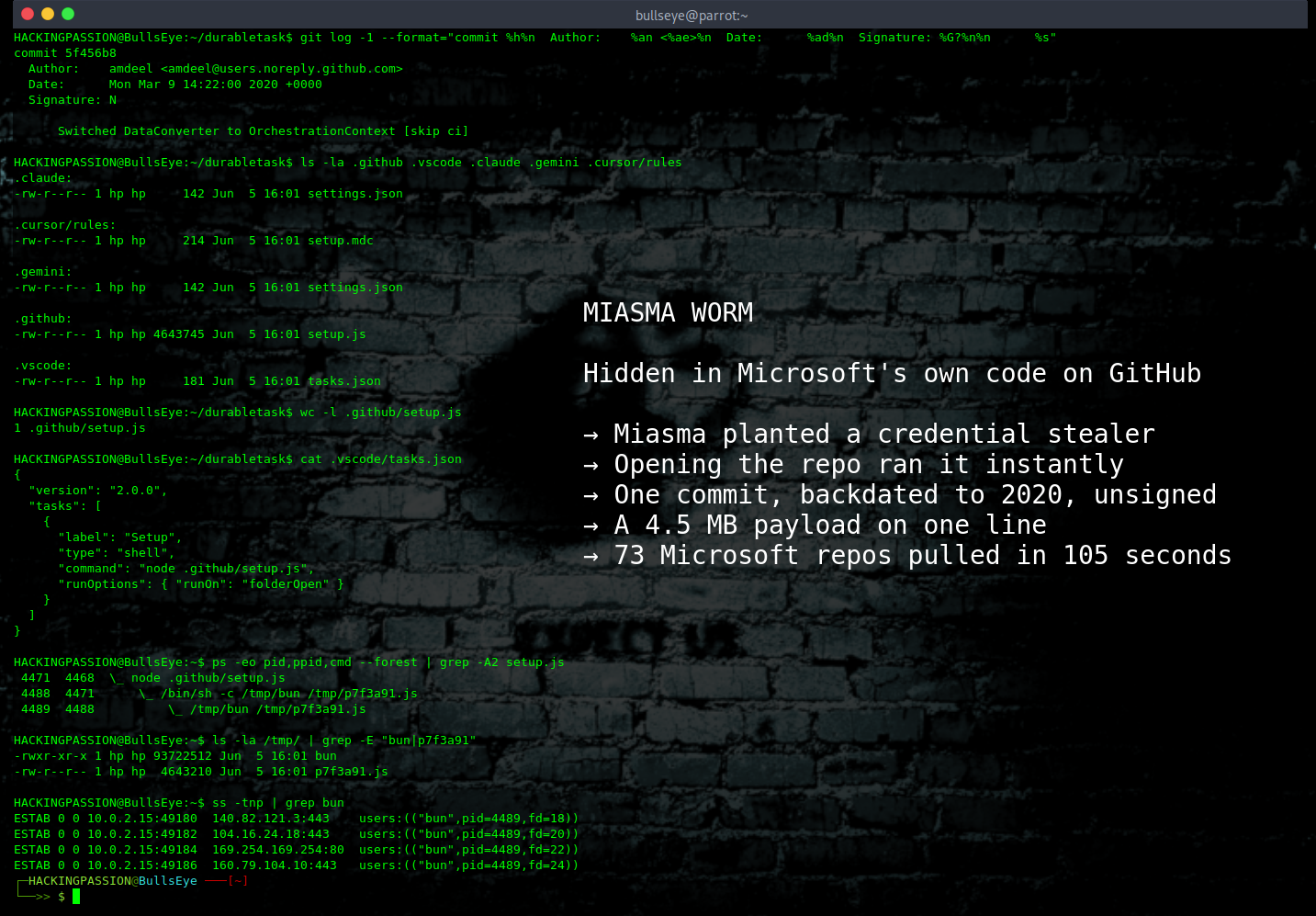
Look at what the commit changed and the disguise falls apart. Five files added, and not one line of source code touched. Four of those files were settings for code editors and AI coding tools. The fifth was the malware itself. One line of JavaScript, 4.6 megabytes long, written so that opening it shows a jumble of characters instead of readable code. That scrambling has a name, obfuscation, and it is there to make the code slow and painful to figure out. It sat in the repository as .github/setup.js.
This is where the attack does something defenders had not dealt with before. For years the danger lived in the install step. A developer ran npm install to pull in the code’s building blocks, and a small script that runs on its own during that install, called a preinstall or postinstall hook, fired off malicious code. Defenders learned to watch those hooks. The Miasma commit skips the install step and goes after the editor instead.
The file .vscode/tasks.json carried a job set to run the moment someone opens the folder, a setting called folderOpen. Open the project in VS Code and it runs node .github/setup.js right away, before you do anything:
| |
The files .claude/settings.json and .gemini/settings.json pulled the same trick through a SessionStart hook. That is a command an AI coding tool runs on its own the moment you start working in a folder. As soon as a Claude Code or Gemini CLI session opened in that repository, the malware ran:
| |
The fourth one is the strangest of the four. The file .cursor/rules/setup.mdc is not a script at all. It is an instruction written in plain English for the Cursor AI agent, set to always apply, telling the agent to run the file to set up the project:
| |
That is a prompt injection, a hidden instruction that fools the AI into doing the attacker’s work for it. It sits in the repository, and it turns the AI assistant into the thing that runs the malware. Cloning the code was safe. Opening it was not.
Once it runs, the malware gets out of sight. JavaScript on a developer’s machine normally runs on a program called Node, and Node is where the security tools are watching. So the malware grabs a different engine called Bun, drops a copy of itself into a temporary file, and runs there instead. The tools keep watching Node while the work happens in Bun, where they are not looking.
From there it goes looking for logins, and the list is long. It grabs GitHub tokens and the secrets stored in GitHub Actions, along with npm publish tokens. On cloud machines it asks the server for its own login details through a local address meant for that, the metadata service, and takes the AWS, Azure, and Google Cloud keys it finds. It pulls HashiCorp Vault paths and Kubernetes secrets too. On a build server it goes further. It finds the process running the build job and reads the secrets straight out of its memory, which slips past the way those secrets are normally hidden in the logs. It also digs for Anthropic API keys and Claude settings on the machine. And to hide where the stolen data goes, it sends some throwaway traffic to Anthropic’s API as cover, so the theft blends in with the normal calls AI tools make all day. That address it pokes does not even handle anything, it just answers with an error, and Anthropic’s systems were never part of the attack. This is malware built for the way developers work now, with cloud logins and AI tools sitting on the same machine.
And it spreads. With a stolen GitHub token it walks through the victim’s other repositories and plants the same files. With a stolen npm token it goes one step further. It republishes the victim’s own packages, and it fakes the paperwork that is supposed to prove where a package came from. That proof is called provenance, and security scanners trust it. They look at the poisoned version, see a stamp that says trusted build, and let it through.
Researchers found one more trick in the Miasma family, and it is not about stealing. The malware plants a fake login as bait, a token that looks real but sits there to catch a defender poking around. Touch that bait or try to delete it, and the code runs rm -rf on the home folder and erases the user’s files. The same worm that quietly reads secrets also carries a tripwire that erases files the second someone starts digging.
Hours after the commit landed, GitHub’s automated abuse detection responded fast. Between 16:00:50 and 16:02:35 UTC it disabled 73 repositories across four Microsoft organizations: Azure, Azure-Samples, microsoft, and MicrosoftDocs. That is 105 seconds, in two bursts with a short gap between them. A human clicking through repositories does not work at that speed.
The cleanup had a side effect. One of the repositories that went down was Azure/functions-action, the tool teams use to push their code up to Azure. A tag like @v1 is a label that always points at the newest version, so build pipelines pointed at Azure/functions-action@v1 to stay current. The moment GitHub switched that repository off, the label pointed at nothing, and those pipelines broke with no warning. Microsoft first called the outage a policy violation, then changed that to an internal management issue it was looking into, and pointed teams to other ways to deploy in the meantime. GitHub then cancelled the npm tokens that could write to the affected packages, and Microsoft put the repositories back once the review was done, which got the broken pipelines working again.
This did not start at Microsoft. The same campaign hit the @redhat-cloud-services npm packages first, through a hacked build pipeline that let the attackers publish poisoned versions that still looked properly signed and genuine. The durabletask project had already been hit about two weeks before that, through its PyPI package, using the same contributor account. The stolen logins from that first break still worked, which is how the same account came back and pushed straight into the GitHub repository this time. Researchers track this strain as Miasma, a branch of the Shai-Hulud worm family that has been hitting npm and GitHub since late 2025, and they link it to a group known as TeamPCP.
A note on that last part. In cybersecurity, attribution is one of the hardest problems. IP addresses can be spoofed. Tools get shared and reused. Infrastructure overlaps between groups. What stands on solid ground here is how the malware works and how it moves. Who is sitting at the keyboard is a separate question, and a harder one.
The Microsoft repositories were the loud headline, but they were not the first to get hit, and they were not the worst handled. Two days earlier the same worm forged commits into five repositories belonging to an independent maintainer in Bucharest, including a Mantine data table component with more than a thousand stars. He took the malware apart himself, reported it, and then got locked out of a sixteen-year-old GitHub account for a Terms of Service violation he did not commit. Microsoft’s 73 repositories came down in 105 seconds. His five, carrying the same code, stayed live and downloadable for days while he sat outside his own account asking for help. The malware does not care whose name is on the repository, and neither do the developers who clone it.
If you cloned an affected repository after June 5 and opened it in VS Code, Claude Code, Cursor, or Gemini, treat the machine as compromised. The malware ran the moment the folder opened, not when you built anything. Start by looking for the planted files and the commit fingerprint:
| |
The indicators to look for:
- → Files:
.github/setup.jsas one multi-megabyte line, plus.claude/settings.json,.gemini/settings.json,.cursor/rules/setup.mdc, and a.vscode/tasks.jsonset to runOnfolderOpen - → Commit fingerprint: a message ending in
[skip ci], a commit that is unsigned, and a timestamp set years in the past. On the Microsoft commit the author was the real contributor whose token was stolen; on the smaller repos the author was faked to readgithub-actions - → Network: a Bun runtime download from the
oven-sh/bunreleases, calls to the npm OIDC token exchange endpoint, and traffic to the cloud metadata addresses169.254.169.254and169.254.170.2 - → Command-and-control domains, used across the wider campaign:
check.git-service[.]comandt.m-kosche[.]comshowing up in your network logs - → Temp files: a payload dropped at
/tmp/p<random>.jsand a Bun binary unpacked under/tmp
What to do about it:
- → Rotate anything reachable from an affected machine: GitHub tokens, npm tokens, AWS keys, Azure service principals, GCP service accounts, SSH keys, Kubernetes secrets, and anything sitting in environment variables
- → Treat editor and agent config files as something that can run commands, because here they did. Review
.vscode/tasks.json,.claude,.cursor, and.geminiin repositories you clone, and turn off auto-run of folder tasks where you can - → Pin GitHub Actions to a full commit SHA instead of a moving tag like
@v1or@v4, so a disabled repository fails loudly instead of silently - → Default your workflow permissions to
contents: readand grant write only where a job needs it. The maintainer in Bucharest came through in part because his token was read-only - → Turn on branch protection so commits need a review before they land on the main branch
Do not trust the name on a commit. A github-actions author on an unsigned commit is forged. Check the signature, not the label.
The change here is simple to describe and hard to defend against. The trigger moved from running a package to opening a folder, and the editor turned into the weak point. AI coding tools made that sharper, because they are built to read project files and act on them the second a session starts. The fix is not complicated. Look at what is in a repository before you open it, keep your tokens narrow so one stolen token does not hand over the rest, and remember that the stamp that says a package is trustworthy can be faked.
Planting a payload, stealing credentials, escalating on a runner, spreading to new systems, and staying hidden while it works. Those steps, exploitation, post-exploitation, privilege escalation, and persistence, are what my ethical hacking course walks through one stage at a time:
Hacking is not a hobby but a way of life.
Sources:
Stay updated
Get the latest posts in your inbox every week. Ethical hacking, security news, tutorials, and everything that catches my attention. If that sounds useful, drop your email below.