 HackingPassion.com
LG Smart TVs Could Be Taken Over From the Same WiFi Without a PIN
Ethical Hacking Complete Course Zero to Expert
Hack like black hat hackers. Penetration testing, Kali Linux, WiFi and web hacking, and the hacker mindset behind it.
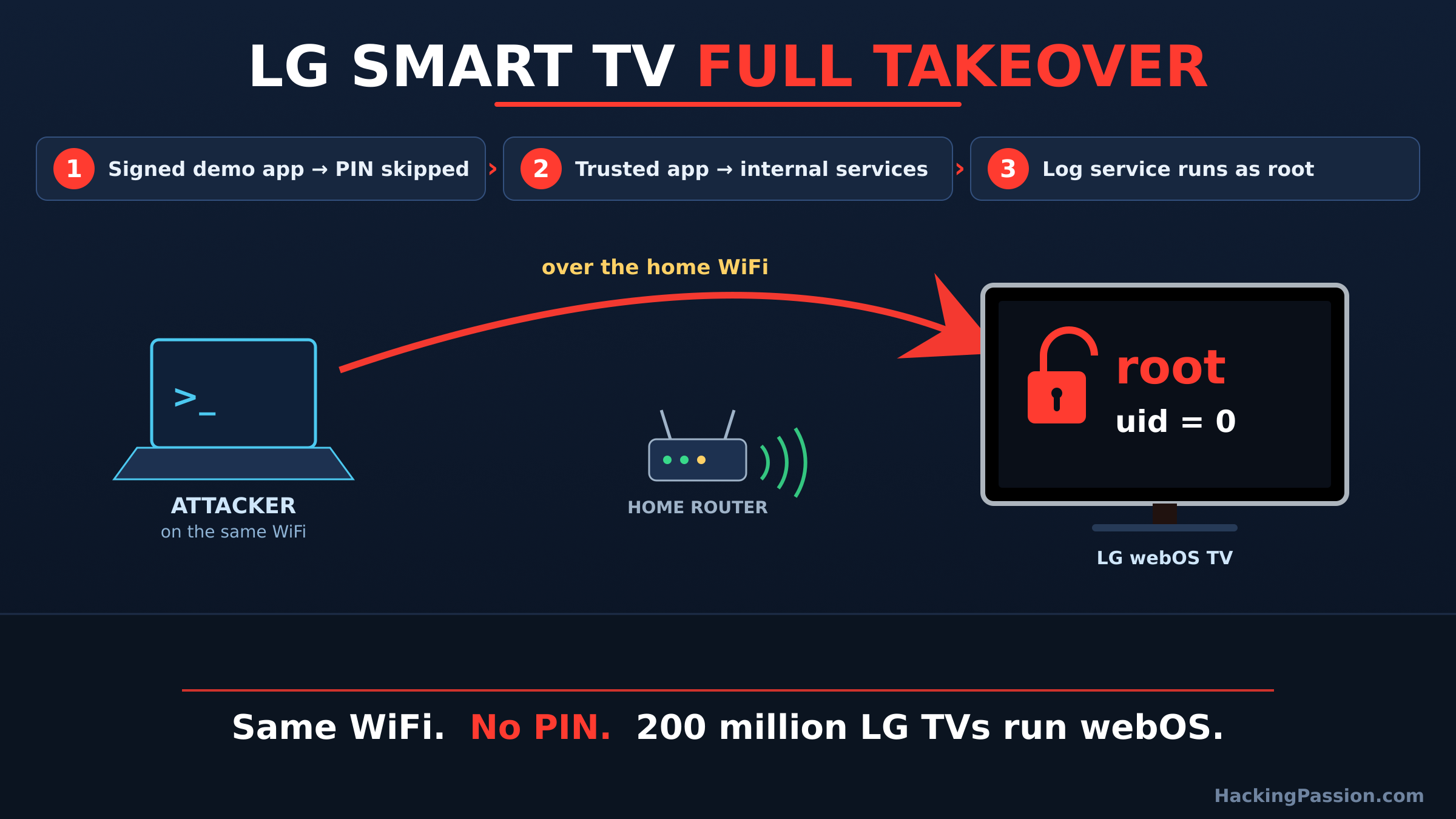
→ Take the full courseThree bugs chained in order gave an attacker full control of a smart TV, straight over the home WiFi, without the set ever asking for its PIN. The owner did nothing wrong. A demo app that ships on the TV, and a test certificate it still trusted, were enough to reach root.
Root is the account that sits above everything else on the machine. With it you can read what is on the TV, change any setting, install software, and switch the hardware on and off.
The person who got there did not touch the remote and did not know the owner’s account. What they needed was a place on the same network. A guest who got the WiFi password once, a phone in the house with a bad app on it, or a laptop that was already infected. Any of those is close enough.
A smart TV sits in the corner and plays Netflix. Underneath it is a computer with its own operating system, and it can be attacked like any other.
LG calls that system webOS. By the company’s own count it runs on more than 200 million LG televisions. This attack was built and shown on two of them.
An independent researcher showed it at TyphoonPWN 2026, a live hacking contest in Seoul run by a company called SSD Secure Disclosure. At a contest like this, a researcher brings a working attack, runs it on stage against the device, and gets paid if it lands. The prize pool reaches into the hundreds of thousands of dollars.
This one took third place in the LG category. The researcher chose to stay anonymous, and the full writeup went public on October 12.
It was tested on two sets, the LG 32LQ636BPSA and the 27TQ600SW. Both ran webOS 7.5.7-25 on firmware 04.54.40. They are small sets, a 32-inch and a 27-inch, the kind that end up in a kitchen or a bedroom. How far it reaches past those two, the research does not say.
Start with how the TV is supposed to stay safe.
To run the TV from your phone, you use LG’s ThinQ app, and the two have to be introduced first. The TV shows a code on the screen. You type that code into the phone. Only then does the TV trust it.
That on-screen code does one job: it proves the phone is in the same room as the person with the remote, and not someone sitting out on the network.
webOS also keeps its apps apart, so a small app cannot reach in and call the services that run the television. Three mistakes take all of that apart, one after the other.
The first mistake is about that code.
These TVs ship with a small built-in app called sync-demo. It is the kind of app that runs on a demo set in a shop. Inside it sits a pairing file, signed by LG itself so the TV knows it is genuine.
The attacker copies that signed file and sends it to the part of the TV that handles pairing. Two things go wrong at the same time.
The file asks for a permission called STB_INTERNAL_CONNECTION. The TV reads that as a connection it already trusts from the inside, so it decides no code needs to be shown.
Someone signed that file with a test certificate, the kind developers use on the workbench. A TV in a living room should never have trusted it. This one did.
So the TV skips the code and hands back a key at its highest level of trust.
One key is not full control yet. The second mistake widens the opening.
Another built-in app, cmp-client, can be told to open a web page. It takes the address of that page from whoever starts it.
Before it opens the page, it runs one weak check. It asks the address whether it is there, and if it answers, the app loads it. It never checks where the address actually points.
So the attacker points it at a page of their own.
What makes this serious is where that page runs. It runs inside a trusted app, and it keeps that app’s line to the services deep inside the TV. A web page the attacker wrote can now call controls that an outside connection is never allowed to touch.
The third mistake runs the command.
The TV has a service that collects log files, called pmlogd. One of its jobs asks for the name of a folder to put the logs in, and it builds a system command out of whatever name it is handed. It drops that name into the command without cleaning it first.
Send it an ordinary folder name and nothing happens. Send it a folder name with an extra command added on, and the TV runs the extra command too.
pmlogd runs as root. So the command runs as root.
Put the three together and the path is short: skip the code, reach the service that was supposed to be out of reach, and run a command as the most powerful user on the machine. The researcher’s proof ends with the TV printing uid=0. That is the system’s own way of saying you are root.
A rooted TV is a foothold inside the house.
From there an attacker can look across the home network and find the router, the laptops, the phones and the other smart gadgets, and go after those too. They can leave their own software on the set, quiet and out of sight, and use the TV as one more machine in a botnet that attacks other people. They can reach the accounts you signed into on the set.
Earlier work on webOS by security researchers listed the same risks: move sideways through the network, pull the TV into a botnet, or watch the owner.
Most of the news stopped at one line: three bugs, no CVE. LG’s own security bulletin tells more.
In its September update, labelled SMR-SEP-2026, LG lists five problems, not three. LG rates all five High. All five landed on the same day, June 18, 2026, and LG credits them to SSD Secure Disclosure.
Three of them are the ones in the public writeup: the hard-coded secret in sync-demo, the weak address check in cmp-client, and the command injection in pmlogd.
The other two never made the writeup. One is a way past the login check in the second-screen gateway service. The other lets an attacker gain higher rights through the first-time setup screen.
So “no CVE” is true in one narrow way. These did not get numbers from MITRE, the body that hands out CVE numbers. In any practical way it is wrong. LG runs its own list, which it calls LVE, and on that list the flaws were logged, numbered and fixed.
One detail is easy to miss.
That second-screen gateway service, the one with the login bypass on this year’s list, is the same service Bitdefender broke in 2024. Back then, one of their bugs, CVE-2023-6317, slipped past the security PIN in that service and created a privileged account with no action from the owner. A second, CVE-2023-6318, ran commands as root.
Two years later, a different team, the same two moves: get past the check that proves you belong, then run a command as root. The service even carries the same name.
That 2024 round was not small either. The firm found four flaws across webOS versions 4 through 7. When they searched Shodan, the search engine for devices connected to the internet, they counted more than 91,000 TVs with the weak service open to the public internet. It was only ever meant for the home network.
LG fixed those in 2024. And it keeps happening at this one contest. A year earlier, at TyphoonPWN 2025, another researcher took first place in the LG category with a different chain. That one walked out of a folder it was locked into and read the stored keys of phones that had paired with the TV.
The living-room set has become a regular target in Seoul.
The limits matter too. Only those two sets were tested, so how far the chain reaches across other webOS 7.5 models is not something the research settles.
The attacker has to be on the same network as the TV. Someone has to be past the router already, on a network the TV trusts by default. The open internet does not reach it directly.
And LG has pushed a fix, on its TV security bulletin page. A set that is up to date, and off the affected firmware, is not open to this chain.
LG says it sends security updates to a webOS platform for five years after that platform first ships. A set older than that window eventually drops off the list, which is worth checking if the TV in the room has a few years on it.
What you can do:
- → Update your TV’s firmware now, and turn on automatic updates so the next fix arrives on its own
- → Look at what is connected to your home WiFi, and drop anything you do not recognise
- → Put your smart TV and other smart-home gear on a separate guest network, away from your phone and your computer
- → Treat the local network as something that can be reached; a guest’s phone sits on it too
- → If a TV does not need the internet for what you watch on it, there is no harm in taking it off the network
- → In the TV’s settings, turn off the microphone and voice features if you do not use them
Want to see what is really sitting on your own home network the way an attacker does, including that smart TV, and find the ones left open? My Ethical Hacking Complete Course Zero to Expert takes you there step by step: reconnaissance, scanning, exploitation and traffic analysis, hands-on, from your first day with no Linux or hacking background.
→ Join my complete ethical hacking course
Hacking is not a hobby but a way of life.
Sources:
SSD Secure Disclosure | LG Product Security | Bitdefender Labs
Stay updated
Get the latest posts in your inbox every week. Ethical hacking, security news, tutorials, and everything that catches my attention. If that sounds useful, drop your email below.