 HackingPassion.com
Keurig Smart Coffee Makers Have a Camera Inside and Keurig Wrote It Into Its Privacy Policy in 2020
Ethical Hacking Complete Course Zero to Expert
Hack like black hat hackers. Penetration testing, Kali Linux, WiFi and web hacking, and the hacker mindset behind it.
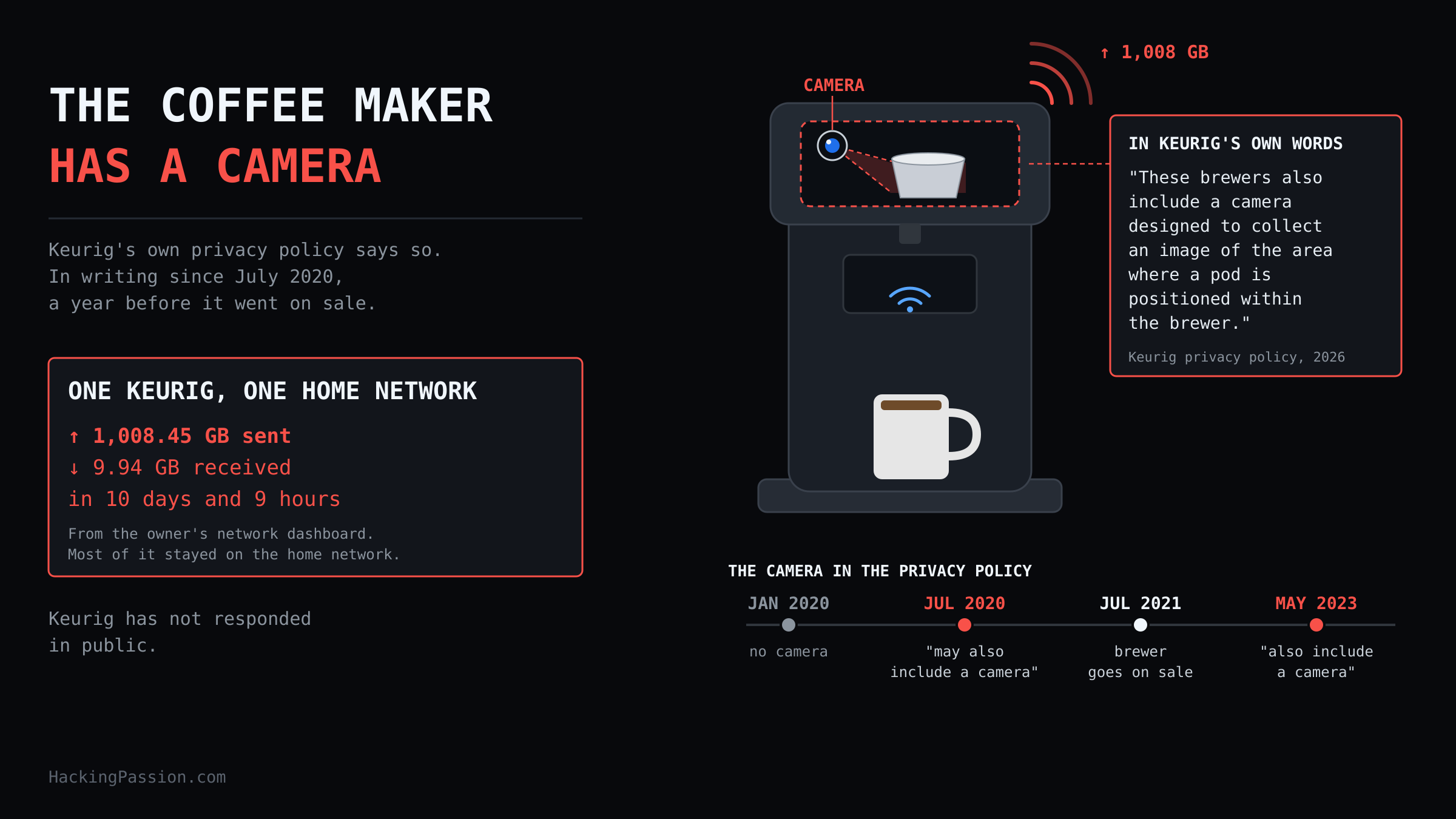
→ Take the full course1,008 GB in 10 days from one coffee maker on a home network. 100 times what it took in. It only had to make coffee. Keurig’s policy says these brewers have a camera inside, and has since 2020.
On October 6, a man who goes by Nomad on X opened the network dashboard he keeps for his parents’ house. He has worked in IT for more than ten years and now works at Prusa, the 3D printer maker. He looks after their network from a distance, and the system he uses for that, UniFi, shows how much data each device in the house sends and receives.
One line stood out. A device called Keurig-20CE2A28C5CE, the Keurig K-Supreme SMART his parents own. In 10 days and 9 hours it had sent 1,008.45 GB and received 9.94 GB.
Received is what comes in, like a film, an update or a web page. Sent is what a device pushes out. This coffee maker sent about a hundred times more than it received. That is about 97 GB a day, or roughly 9 megabits per second, day and night, from a machine that makes coffee.
He unplugged it, posted the screenshot and said his parents were getting a new coffee maker. The post passed 2.4 million views.
Later that day he looked closer. Most of that traffic never left the house. It went onto the home network and not out to the internet, and he thinks it was a bug in that one unit. It still filled up the WiFi access point the coffee maker was connected to, the box that the wireless devices in the house talk to.
The brewer already sat on a separate network for smart devices, often called an IoT network, apart from the laptops and phones. He thought about capturing its packets to see what was inside them, but chose to keep it offline. A device that can flood a network like that, he wrote, is not worth keeping connected.
Keurig had not responded in public by the time of writing. He never captured that traffic, so what was inside the terabyte is still unknown.
Keurig’s privacy policy, in effect since February 13, 2026, spells out what the coffee maker is built to collect. It covers the company’s website and app, and also what it calls its Internet connected devices, the smart brewers.
For those brewers, Keurig collects your usage history: which drink, what size and how strong. Then comes this sentence:
“These brewers also include a camera designed to collect an image of the area where a pod is positioned within the brewer.”
According to the policy, some connected features need that camera. Keurig may also use it for diagnostics, to check that the brewer works properly.
The same part of the policy lists what Keurig picks up from the device you use for its services. Your IP address, a device ID, advertising IDs, your operating system, its software version and your time zone are in there. So is information about your wireless and mobile connection, like your service provider and how strong your signal is.
The feature that has to know which pod is in the brewer is called BrewID, although the policy does not tie the camera to it by name.
BrewID came out on July 27, 2021, with the K-Supreme Plus SMART, at 199.99 dollars. Once the brewer is on WiFi, it recognizes the brand and roast of the K-Cup pod you put in and sets the brew to what the roaster recommends. Keurig says that works for more than 900 pod varieties.
It also keeps count. It tracks how many pods you use, and with Auto-Delivery it orders new ones before you run out.
The brewer only joins a home network on 2.4 GHz with WPA2-PSK, the ordinary WiFi with a single password.
Further down is a section that privacy law asks for, where “sold” and “shared” are legal terms. In it, Keurig Dr Pepper, the company behind Keurig, lists what it has sold or shared for analytics and for ads aimed at you:
- → Identifiers and contact information
- → Location, not precise
- → Internet and electronic activity
- → Profile inferences, the conclusions a company draws about you from your data
For each of those four, the policy names the same receivers: third party advertisers, data analytics providers and the company’s own affiliates, the other companies in its group.
The policy also says Keurig may use outside analytics and tracking tools, and it names Google Analytics. Those tools help Keurig, or the companies behind them, show you more targeted ads, on Keurig’s own services and across the internet.
That list covers all of Keurig’s services together, so the policy does not say whether anything from the coffee maker itself is part of it.
The app says more. Its page on Apple’s App Store lists six types of data that may be used to track you: purchases, contact info, search history, browsing history, identifiers and usage data.
Tracking has a strict meaning in that store. It means linking what an app collects about you or your device with data from apps and websites owned by other companies, for targeted ads or to measure ads. Sharing that data with a data broker, a company that collects information about people and sells it on, counts too.
Ten types of data are linked to your identity, which means tied to you through your account, your device or other details. Next to those six, the ten include financial info, location, user content and diagnostics.
The camera is not new. I went back through archived copies of the privacy policy. The version that took effect on January 1, 2020 does not mention a camera. The next one, in effect from July 1, 2020, does. The wording was more careful then. The smart brewers “may also include” a camera, and it “may be required” for some services.
The K-Supreme Plus SMART came out with BrewID on July 27, 2021. Keurig wrote the camera into its privacy policy a year before that brewer was on sale.
By the version that took effect on May 8, 2023, both of those mays were gone. Since then the policy says these brewers include a camera, and that it is required.
The version that took effect on January 27, 2022 has something else in it. Its section for California residents opens with this sentence: “At Keurig Dr Pepper, we do not sell your data.” A few lines further down, the same section lists what the company sold in the previous 12 months, for ads aimed at you. Identifiers, geolocation, internet activity and profile inferences went to third party advertisers and to its own affiliates.
The policy explains the gap itself: under California law, a sale also covers the way the company shares limited customer information among its affiliates.
By May 2023, the sentence about not selling your data was gone. The list is still there in the current version, now as sold or shared, with data analytics providers added to the receivers.
The man who found the terabyte also called the brewer DRM waiting to be switched on, a lock that could force you onto official Keurig pods. He did not explain where that came from, but Keurig has done this before, and the lock was broken the same year.
In 2014, Keurig launched the Keurig 2.0. Those brewers ran software that only accepted pods licensed by Keurig. The check sat in the lid. The Boston Globe described a built-in infrared sensor that looked for an invisible ink printed on the foil lid. A pod without that ink got a message on the screen: “Oops! This pack wasn’t designed for this brewer.”
The My K-Cup, a reusable pod you filled with your own coffee, was dropped from the line.
Keurig’s own side used another word. In August 2014, a spokesperson for Green Mountain Coffee Roasters, then the parent company of Keurig, said each Keurig 2.0 brewer would have a camera that can “read” a proprietary taggant material. That is a hidden marker, she said, “embedded on the lid of each Keurig brand pack.” The two descriptions differ, and both are about the same job: seeing which pod is in the brewer.
On December 9, 2014, Kenneth Buckler of Caffeine Security posted an advisory, a public warning about a security hole, on Full Disclosure, a mailing list where researchers publish flaws. He called it the Keurig 2.0 Genuine K-Cup Spoofing Vulnerability. The brewer checked the lid, but it did not check whether that lid had been used before.
So the attack was a used lid. Brew a genuine pod, peel its foil lid off in one piece and keep it. Put a pod from another brand in the brewer, lay the saved lid on top with the puncture hole lined up, close the brewer, and it brews. He gave the flaw a severity score of 4.9 out of 10.
In May 2015, the company reported that sales of brewers and accessories had fallen 23 percent in a quarter. On the call with investors, CEO Brian Kelley said Keurig had underestimated how much people cared about the reusable pod, and that taking it away had been wrong. He said it would come back.
Back in February 2014, TreeHouse Foods filed an antitrust suit against Keurig in New York, a case about unfair control of a market. From March 2014, 27 class actions with similar claims followed, lawsuits filed for a whole group of buyers at once. In July 2020, Keurig agreed to pay 31 million dollars to settle with one group of them: buyers who got their Keurig products through stores and other sellers instead of from Keurig directly.
In 2014, Keurig talked about a camera that reads the lid. Today its own policy says the smart brewers have a camera aimed at the pod, and nothing in that policy or on the product pages says it is used to block pods.
Keurig brewers stood in about 40 million US households, according to the company’s own numbers from February 2024.
You can check for yourself what a smart device in your own house sends, by letting it connect through a machine you control. On a Linux laptop with WiFi, NetworkManager can turn the laptop into a hotspot, its own small WiFi network.
Keurig’s smart brewers need a 2.4 GHz network, so set the band to bg, which is the 2.4 GHz setting. Replace wlan0 with the name of your WiFi card; nmcli device shows it:
| |
Connect the device to that network. Then capture its traffic with tshark, the command line version of Wireshark, and filter on the device’s MAC address, the hardware address you find in your router or in the device’s own network settings:
| |
Let it run for a while and stop it with Ctrl+C. The content of the connections stays encrypted, but two things stay readable. Before a device opens a connection, it looks up the name of the server it wants to reach. When the encrypted connection starts, it says that name again. Those are the DNS lookup and the Server Name Indication, or SNI, and together they show who the device talks to:
| |
Do this only with your own devices, on your own network.
What you can do:
- → Open your router or mesh app and look at the data per device; that is where this one showed up
- → Put smart devices like a coffee maker or a TV on a separate guest or IoT network, away from your laptop and phone
- → If you never use the Keurig app, there is no reason to keep the brewer on WiFi
- → In the US, use the “Do Not Sell or Share My Personal Information” link at the bottom of keurig.com
- → On an iPhone, open the App Privacy part of an app’s store page before you install it
- → Before you buy a smart appliance, read the part of its privacy policy about connected devices; that is where Keurig put the camera
Want to know what your own smart devices send? Run a hotspot, capture with Wireshark and read the server names they look up. My Ethical Hacking Complete Course Zero to Expert takes you there step by step: reconnaissance, scanning, exploitation and traffic analysis, hands-on, from your first day with no Linux or hacking background.
→ Join my complete ethical hacking course
Hacking is not a hobby but a way of life.
Sources:
Nomad on X | Keurig Privacy Policy | Keurig Privacy Policy, July 2020 version | Keurig 2.0 Genuine K-Cup Spoofing Vulnerability
Stay updated
Get the latest posts in your inbox every week. Ethical hacking, security news, tutorials, and everything that catches my attention. If that sounds useful, drop your email below.