 HackingPassion.com
ASP.NET Websites Get Taken Over Through the Module That Was Supposed to Protect Them
Ethical Hacking Complete Course Zero to Expert
Hack like black hat hackers. Penetration testing, Kali Linux, WiFi and web hacking, and the hacker mindset behind it.
→ Take the full courseHackers took over a Windows web server with one request, and a cookie with a 1 in it is enough. The site had added a security module to stop attacks, and that module let them in. It dates from 2008, it will never be fixed, and an exploit for it is now on GitHub.
# TL;DR
Attackers got into a web server running ASP.NET, Microsoft’s framework for building websites. Investigators from Mandiant and Google Cloud’s FLARE team came in to find out how. On November 4 they had the answer: a small library called Idunno.AntiCsrf.dll.
That file was the security module the website had installed to stop attacks.
On November 18, Mandiant published what they found. The flaw got a number, CVE-2026-131914, and a score of 9.3 out of 10. The researchers had also seen it used in attacks. Whose server it was, how many other servers still run this module, and who is behind it, they do not say.
The module protects against something called CSRF, Cross-Site Request Forgery. Say it is 2008 and you are logged in to the portal at work. In another tab you open some other website, and that page quietly sends a form to your portal in the background. Your browser adds your login cookie to that request by itself. The portal sees a request from you, logged in, and carries it out. Your password or your email address can be changed that way while you are reading something else in the other tab.
Since 2020, Chrome no longer sends such cookies with forms from other websites by default, unless the site allows it.
The defense against CSRF is a secret. The website puts a random value in a hidden field in its own forms, and checks that the same value comes back. The other website cannot read that value, so its forged form shows up without it and gets refused.
AntiCSRF did this with a trick called double submit. When a page with a form went out, the module gave the browser a temporary cookie with a random value in it, a GUID. The same value went into a hidden form field called __CSRFTOKEN. When the form came back, the module compared the two. Same value, the request went through. Different value, the module threw an error or sent the visitor to an error page.
Before that value went into the hidden field, the module packed it with ObjectStateFormatter, a serializer that comes with ASP.NET. When the form came back, it unpacked the field again and then compared.
Two developers published it on Microsoft’s CodePlex in December 2008. It was downloaded 548 times by early 2011, and its own page warned it should not be the only protection.
The last version, 0.9.1 Beta, is dated December 15, 2008. The project page explains why the module was there in the first place. In those days, the normal way to protect an ASP.NET form against CSRF was ViewState together with a setting called ViewStateUserKey. That only works with ViewState switched on and a session to tell users apart. AntiCSRF was for sites that did not want either. All it asked for was cookies in the browser.
Installing it was easy. You dropped the DLL into the bin folder and added one line to Web.config:
| |
From that moment on, the module stood in front of the WebForms pages of the site.
IIS, the web server built into Windows, runs an ASP.NET website inside a process called w3wp.exe. A request goes through a fixed row of steps before it reaches the page, and a module like this one can hook into those steps. AntiCSRF hooks into an early one, PreRequestHandlerExecute. At that moment the page has not started yet. Page_Load has not run, and the developer’s own code for that page has not run either.
There, the module looks at a POST request and checks two things: is there a CSRF cookie, and is there a CSRF form field. Neither may be empty, and that is it. Whether the cookie looks anything like the random value it is supposed to hold, it does not check.
Then it takes the form field and unpacks it with a fresh ObjectStateFormatter, made without any arguments. Made like that, it rebuilds whatever the data tells it to rebuild, without a key and without checking a signature. Only after that does the module compare the result with the cookie.
Unpacking data back into objects is called deserialization, and in .NET it is dangerous with data from outside. Some object types run code while they are being rebuilt. Chain the right ones together and the last one runs a command the attacker chose. That chain is called a gadget chain, and the free tool ysoserial.net builds them, also for ObjectStateFormatter. The researchers do not say which chain the attackers used.
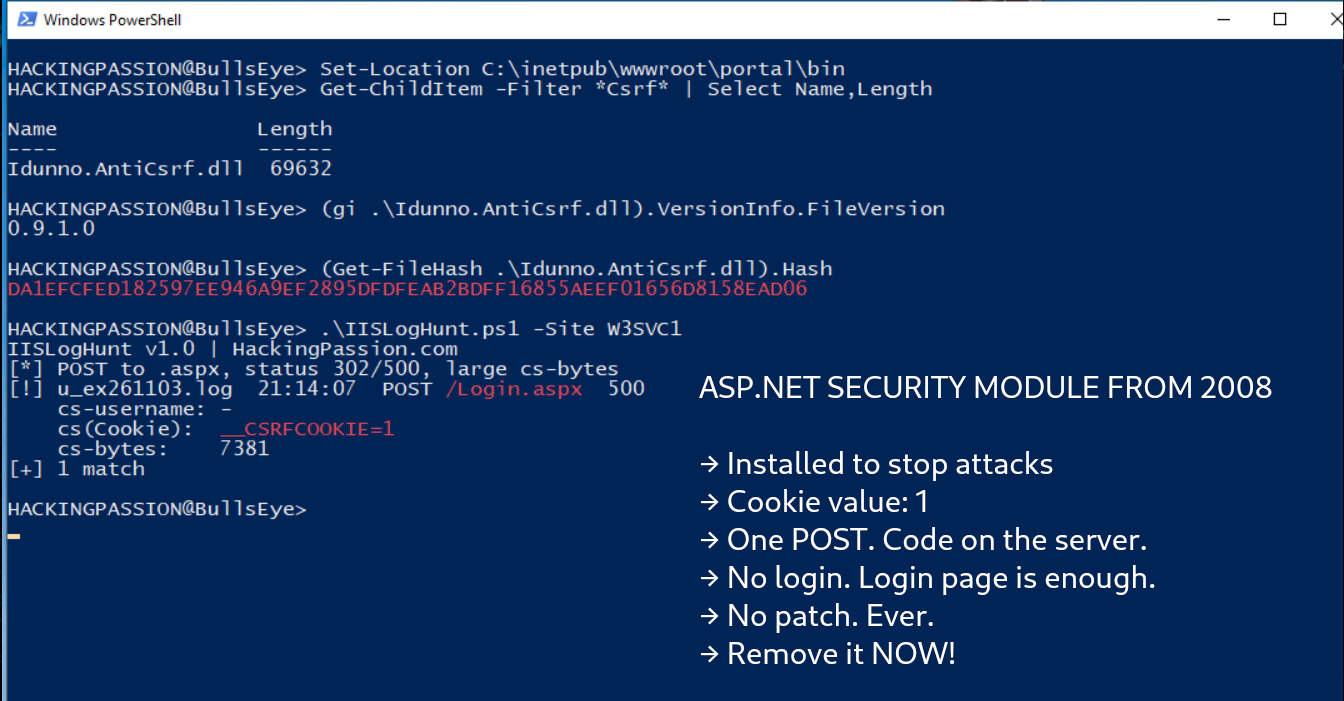
So the attack needs a cookie with a 1 in it, a gadget chain in the form field, encoded in Base64, and one POST request to a page. The advisory even uses that cookie as its own example. The request looks like this:
| |
The module unpacks the field, and the gadget chain runs inside w3wp.exe with the rights of the website. Then the module gets to its check, sees that 1 does not match, and throws its error or sends a redirect. The server answers with a 500 or a 302. By then, the attacker’s code has already run. The researchers call it a complete compromise of the web server.
Logging in is not needed. Pages that ASP.NET locks behind a login in Web.config are out of reach, because that check runs earlier. But a page a visitor can open without logging in is enough, and so is a page that only checks the login inside Page_Load. A site with a login has at least one page that opens without an account: the login page itself. One of the public exploits ran its commands through /Login.aspx.
The page does not even need a form on it. The module skips only the pages the developer opted out by hand, with a SuppressCsrfCheck attribute or an ISuppressCsrfCheck interface.
The researchers found one more bug while they were in there. Leave the csrfSettings section out of Web.config, and a mistake in the settings code renames the form field to RaiseException. The module then reads its token from a field called RaiseException, and the same unpacking runs on whatever arrives in it.
ObjectStateFormatter is the same serializer ASP.NET uses for ViewState, the hidden __VIEWSTATE field that WebForms pages send back and forth each time a form goes to the server. Microsoft knows how dangerous that field is when it goes unchecked.
ASP.NET can sign ViewState with a MAC, a checksum made with the server’s secret key, and throw out anything that does not match. The setting for that is called EnableViewStateMac, and for years developers could switch it off.
In July 2010, a security program manager at Microsoft wrote in MSDN Magazine about the advice to turn the MAC off for speed, and told developers not to follow it. In December 2013, Microsoft released an optional update, KB 2905247, that blocks the setting. On September 9, 2014, the company pushed it out through Windows Update, and from then on ASP.NET 1.1 up to 4.5.2 refused the setting. The ASP.NET team wrote that it is never safe to turn the MAC off, and that a site with the MAC off stays open to remote code execution.
AntiCSRF calls ObjectStateFormatter itself, without a key, on a field it made itself. What Microsoft forced onto ASP.NET servers in 2014 never touches it. And this was the module made for sites that wanted to stay away from ViewState.
The same serializer has been used to break into servers before. Each time, the attackers needed something first.
→ February 2020, Exchange. Each Exchange installation came with the same
validationKeyanddecryptionKeyin itsweb.config. With those known keys, an attacker could make the server unpack crafted ViewState and run code as SYSTEM. Microsoft fixed it as CVE-2020-0688. The attacker still had to log in to the Exchange Control Panel, although any account would do.→ December 2024. Microsoft saw attackers send malicious ViewState to an IIS server, signed with a machine key someone had published online. It loaded the Godzilla post-exploitation framework. Microsoft counted more than 3,000 public keys that could be used the same way.
→ July 2025, SharePoint. During the ToolShell attacks, the attackers dropped a web shell called
spinstall0.aspxon servers. Its job was to read out theMachineKey. Microsoft told SharePoint admins to replace those keys after patching.
With AntiCSRF, the attacker needs neither a key nor an account.
A fix will not come. CodePlex has been retired, the project has no maintainer, and 0.9.1 Beta from 2008 is the last version there is. With no vendor to report the flaw to, the researchers requested the CVE themselves on November 11 and published a week later. Their advice is to remove the module.
The CVE record does not agree with itself. The score from the researchers marks the flaw as attacked. Ten minutes after the record was published, CISA added its own rating to the same record, and that one says exploitation: none. As of November 23, the flaw was also not on CISA’s list of known exploited vulnerabilities, the list US federal agencies have to patch from.
On November 24, two exploits for it showed up on GitHub. One unpacks a harmless object and never sends a request through the module. The other runs commands. Its maker writes that it worked on November 23 against the original 2008 DLL on IIS 10, without logging in.
548 downloads by early 2011 sounds small. In November 2026 the module was still running on a server, and the attackers found it before the researchers did.
What you can do if you run ASP.NET WebForms sites:
- → Search
Web.configforIdunno.AntiCsrf,AntiCsrfModuleandcsrfSettings, and search the bin folders forIdunno.AntiCsrf.dll. In PowerShell, with your own web root as the path:
| |
- → The advisory lists three known builds of
Idunno.AntiCsrf.dll. A version that someone compiled with other settings has a different hash and the same flaw, so search by name as well.
| |
→ Look in the IIS logs for POST requests to .aspx pages that got a 302 or a 500 back. Watch for unusually large ones in the
cs-bytesfield, if your logs record it.→ Found it, and there are signs someone used it? Replace the
machineKey, the encryption keys and the database passwords inWeb.configandapplicationHost.config. Then check the web root for files you did not put there.→ Remove the module, its lines in
Web.configand the DLL. Switch to a protection that is still maintained: AntiForgery fromSystem.Web.Helpers,ViewStateUserKeywith signed ViewState, orIAntiforgeryin ASP.NET Core.
Want to see the hidden form fields and cookies your own web app sends? Capture a POST with Burp Suite in your lab.
My Ethical Hacking Complete Course Zero to Expert takes you there step by step: reconnaissance, scanning, exploitation and traffic analysis, hands-on, from your first day with no Linux or hacking background.
→ Join my complete ethical hacking course
Hacking is not a hobby but a way of life.
Sources:
Mandiant MNDT-2026-0048 | CVE-2026-131914 | Microsoft ASP.NET Blog
Stay updated
Get the latest posts in your inbox every week. Ethical hacking, security news, tutorials, and everything that catches my attention. If that sounds useful, drop your email below.