 HackingPassion.com
ClickFix Fake CAPTCHA Hides Malware in Your Browser Cache Before You Run a Single Command
Ethical Hacking Complete Course Zero to Expert
Hack like black hat hackers. Penetration testing, Kali Linux, WiFi and web hacking, and the hacker mindset behind it.
→ Take the full courseA CAPTCHA on hacked websites now hides the malware in the browser cache as an image before it asks for anything. When the pasted command runs, nothing gets downloaded. It was already there.
Microsoft Threat Intelligence described this in a post on X on 3 October. Its researchers found a cluster of hacked websites that show a fake human-verification page, the kind that says verifying and carries a Cloudflare logo. The page tells the visitor to press Windows+R, then Ctrl+V, then Enter. Win+R opens the Run box, the small window that launches programs.
The visitor never typed or copied anything. The moment they click the checkbox, JavaScript on the page writes a command to the clipboard on its own, with nothing shown on screen. Ctrl+V pastes whatever the site put there, and Enter runs it. The visitor thinks the site is checking for a bot. The site is getting a command run on the machine.
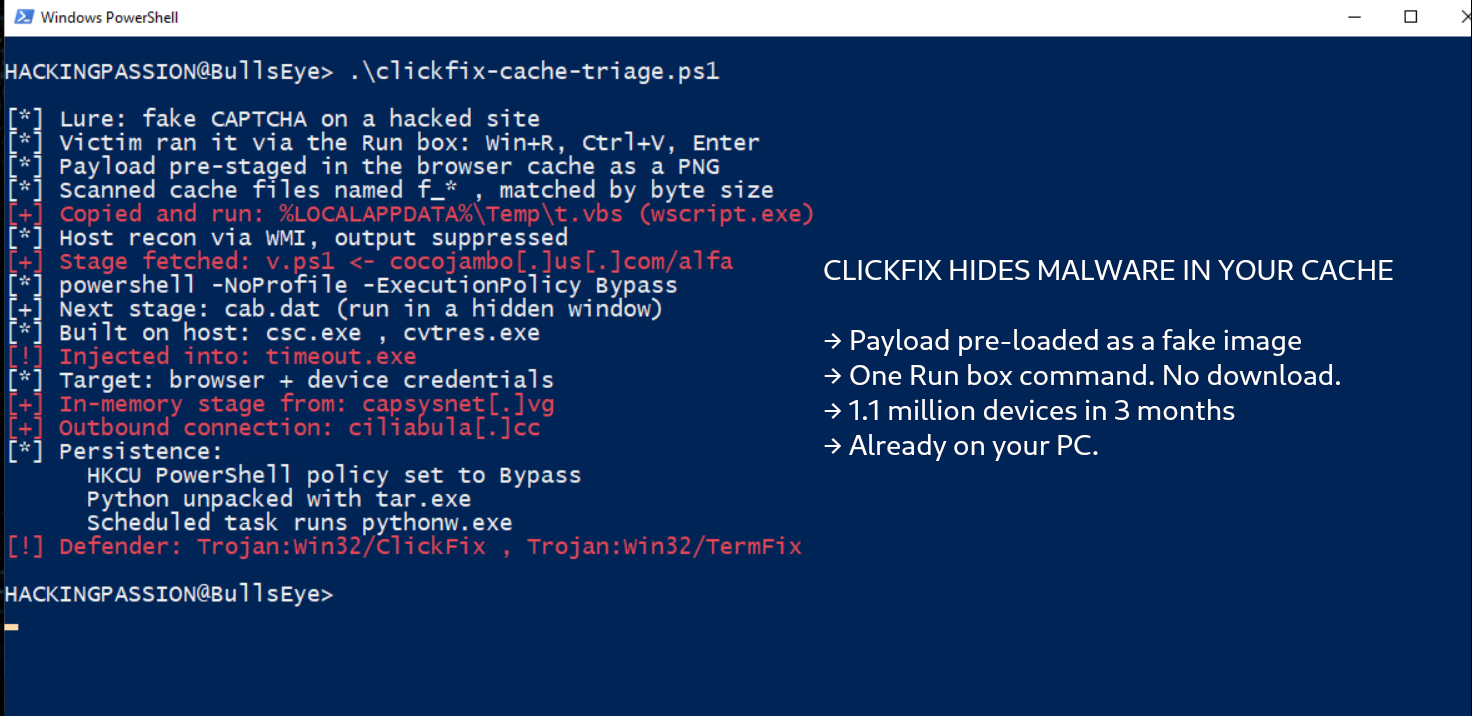
The payload is in place before any of that. While the page loads, it fetches a file in the background, and the browser saves a copy to disk, the way it saves any image, script or stylesheet so it does not fetch them twice. The file is labelled as a PNG, so the browser stores it in its cache like any other image. The pasted command downloads nothing; it only has to find that file again.
The command walks through the browser’s cache folder and checks each file by one property: its size. Older versions searched inside the files for a marker that wrapped the payload; this one matches on size instead, and the researchers note the expected size varies across variants. It copies out the file whose size matches, renames the copy with a .vbs ending so Windows treats it as a script, and runs it with wscript.exe. Output and errors are thrown away, so nothing shows on screen.
The script gathers details about the machine through WMI, a built-in Windows service for querying the system, fetches a PowerShell script called v.ps1, and starts PowerShell with its profile skipped and its execution policy set to bypass, the setting that normally blocks untrusted scripts. A later stage pulls down a file named cab.dat, reads it, and runs it in a hidden window. It compiles fresh code on the spot with the .NET compiler already on Windows, then hands control to timeout.exe, a normal system program it hides inside.
The target is passwords. Microsoft says the later payloads load code into memory, inject it into timeout.exe, and go after the credentials saved in the browser and on the device. The same code opens connections back out and pulls in another stage that never lands on disk.
The malware also stays. It changes a registry setting so PowerShell keeps starting in that same unprotected mode, unpacks Python with the built-in tar.exe, and creates a scheduled task that launches a Python process through pythonw.exe. A reboot brings it back.
The reason for the cache step is a limit. The Run box takes only 260 characters, not enough for a full info-stealer in one line. Attackers work around it two ways. FileFix, a close cousin, sends the victim to paste into the address bar of a file-explorer window, where the limit is 2048 characters, and pads the command with long runs of spaces so only a harmless file path shows. The cache version keeps the command short by planting the heavy part ahead of time.
Chrome makes the planting easy. Anything larger than 16 kilobytes is stored as its own separate file in the cache folder, with no header and only the raw bytes inside. The attacker knows the size of the planted file, so matching on that size is enough to find it among the rest.
Researchers call this cache smuggling. No download happens when the pasted command runs, so a tool that only watches for a download at that moment has nothing to catch. The first payload arrived earlier, labelled as an image, through the browser’s normal work. The later stages do reach out for v.ps1 and cab.dat. What the cache hides is the first step, the one a scanner would otherwise catch.
The trick did not start as an attack. In July 2023 a security researcher, Aurélien Chalot, wrote it up as a method for authorized break-in tests. He labelled a program as an image, let a browser cache it, and then had an employee run one harmless-looking line that moved the file into place and launched it. Windows Defender said nothing, because the cached file had no extension and was never scanned as what it was.
It turned into a live attack two years later. In October 2025 Marcus Hutchins, who stopped the WannaCry outbreak in 2017, found a running campaign while working at the security firm Expel. The lure was a fake Fortinet VPN compliance checker aimed at company laptops, and the copied command was padded with 139 spaces so the victim saw only a clean file path. A hidden PowerShell command behind it pulled the payload from the cache.
By mid-2026 the trick had gone commercial. A Russian loader-for-hire called DOUBLECUP rented out a ClickFix kit that also stashed its payload in a cached PNG, pulled back out with a marker, and used it to drop a loader and a remote-access trojan for paying customers. Microsoft’s cluster goes a step further: the cached file itself is the script, with no marker to find.
ClickFix has become one of the main ways attackers get in. In its 2025 Digital Defense Report, Microsoft called it the most common first step in the cases its Defender Experts handled over the year to June, at 47 percent, ahead of phishing at 35. The 2026 report, out on 1 October, counts ClickFix commands on more than 1.1 million devices between February and early May, about eight times as many, and puts user execution at 30 percent of observed initial access.
It usually ends in an info-stealer like Lumma, though Microsoft has seen it drop remote-access trojans and worms as well. The method keeps changing shape. A version Microsoft wrote up in August as TerminalFix sends victims to paste into Windows Terminal instead, so longer scripts run cleanly. The company has also documented a version that fetches its second stage through a DNS lookup rather than a download, to slip past filters that block web addresses. The cache version is the same trick, hidden one step earlier.
Microsoft’s own tools flag this one. Defender names the command Trojan:Win32/ClickFix and Trojan:Win32/TermFix, and SmartScreen and Defender for Office 365 block the known lure pages. Its advice is to watch the behaviour and not rely on download events: a browser that suddenly launches a script host, or a scheduled task that appears while PowerShell runs without its usual limits.
A verification box never asks you to open the Run box, a terminal or PowerShell and paste a command. A genuine check runs in the page itself. When a site asks for Windows+R and a paste, that is the attack, and the move is to close the tab.
What you can do:
- → Never paste a command from a website into Run, Windows Terminal or PowerShell, whatever the page claims it checks
- → Close any page that tells you to press Windows+R, Ctrl+V and Enter
- → Clear the browser cache after you land on one, so a planted file does not sit there
- → Turn on PowerShell script-block logging so a hidden script leaves a record
Want to see the last commands that ran from your own Run box? Open the registry key RunMRU on your machine and read the list back.
My Ethical Hacking Complete Course Zero to Expert takes you there step by step:
reconnaissance, scanning, exploitation and traffic analysis,
hands-on, from your first day with no Linux or hacking background.
→ Join my complete ethical hacking course
Hacking is not a hobby but a way of life.
Sources:
Microsoft Threat Intelligence | Microsoft Digital Defense Report 2026 | Expel: Cache smuggling | SOCRadar: DOUBLECUP
Stay updated
Get the latest posts in your inbox every week. Ethical hacking, security news, tutorials, and everything that catches my attention. If that sounds useful, drop your email below.